 Pallet
Find out whether the scanner reads the code
Test the scanner using its supported diagnostic workflow or a simple text field where appropriate. If characters appear consistently, the scanner may be reading correctly even though the POS reports Item not found. If nothing appears, start with the label and scanner configuration.
Use a demonstration product record while troubleshooting. Avoid creating accidental sales or changing real inventory counts just to check what the scanner sees.
Compare the exact strings
Compare the scanned identifier character by character with the inventory record. Check leading zeros, spaces and any configured scanner prefix or suffix. An imported spreadsheet may have altered a code even when the printed tag is correct.
For example, an internal label reading PM-ABC123 will not match a POS record keyed only to ABC123 unless the system has an explicit mapping. Do not remove parts of every code without first understanding which field your POS searches.
Check price and quantity after the match works
Register the appropriate product and price in your POS using its supported entry or import process. PalletMargin’s CSV is inventory data; it is not a universal automatic POS integration. Your system may require different column names or an explicit barcode field.
Scan one reviewed item and confirm its title and price. Then check that importing quantities did not add to existing stock when you intended to replace a count. Retain the import report for reconciliation.
If the code will not scan at all
Check for clipping, smearing, glare or folds. Use the exported PDF at actual size rather than a resized screenshot. Confirm that your scanner supports and enables the barcode type on the label.
Test another label from the same sheet and one known working product. This helps separate a single damaged label from a sheet-wide printing issue or a scanner setting. Escalate to the scanner or POS documentation when the failure follows the device rather than the label.
See a sample output
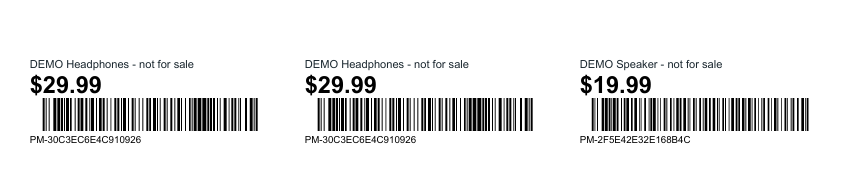
These files were generated with PalletMargin’s exporter using fictional demonstration inventory. Prices are illustrative; the sample is not market research or a ready-to-publish listing.
Download sample barcode tags PDF