 Pallet
Start with the correct sheet
PalletMargin’s current tag PDF uses a US Letter layout with 30 Avery 5160-compatible labels per sheet. Similar-looking sheets can have different margins or gaps. Match the sheet specification before changing your design or printer settings.
Download a fresh PDF and open it in a PDF viewer. Avoid copying a screenshot into a document: its dimensions can change and barcode edges may lose definition.
Remove scaling from the test
Avery recommends the correct page size and 100% scaling. In your print dialog, select US Letter and Actual size or 100%. Options such as Fit, Shrink or multiple pages per sheet can alter the layout.
Print one page on ordinary paper and compare it with the blank label sheet. Check the first and last rows. If the error grows down the page, investigate scale or sheet dimensions before trying to move the entire image.
Distinguish a constant offset from feed drift
If every label is displaced by roughly the same amount, check the selected paper size, printable-area behavior and driver settings. If only some rows shift, inspect paper guides and feeding consistency. Follow the printer manufacturer’s instructions for the label stock you use.
Change one setting at a time and record the result. For example, fixing scale from 97% to 100% should be tested before adjusting other settings. Otherwise you cannot tell which change solved the problem.
Scan a label before printing the batch
Check legibility and barcode scanning after alignment is correct. Test with the actual scanner and POS used at your counter. A sharp-looking barcode can still lead to Item not found if the inventory record has not been created.
Print a small approved set first. Keep labels flat and unobstructed on products, and avoid covering important manufacturer information. Return to the reviewed inventory export if the printed price does not match the price in your POS.
See a sample output
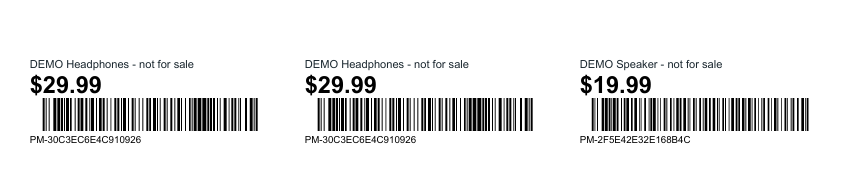
These files were generated with PalletMargin’s exporter using fictional demonstration inventory. Prices are illustrative; the sample is not market research or a ready-to-publish listing.
Download sample barcode tags PDF